¶ How to configure DNS records for a website with May First
These instructions explain how to create or edit DNS records to point your domain to the May First infrastructure so it can be used by your website. What are DNS records?
Note: Apply this guide to all domains and subdomains you plan to use with a May First website (for example, both
mayfirst.organdwww.mayfirst.org).
¶ Preparing for DNS changes
Read more about preparing your changes
¶ 1. Determine where to configure your DNS records
-
If your domain is already using May First nameservers, or if you plan to switch to them, you can configure your DNS records directly in the May First control panel.
See: How to check if you are using the May First Nameservers -
If using external nameservers, you must ALSO follow the instructions the to create or edit DNS records with your external DNS provider.
¶ 2. Lower TTL values (optional)
If you are changing an existing DNS record you can lower TTL (Time To Live) values before planned changes to allow updates to take effect more quickly. Learn how to reduce TTL values.
¶ Configure DNS in the May First control panel
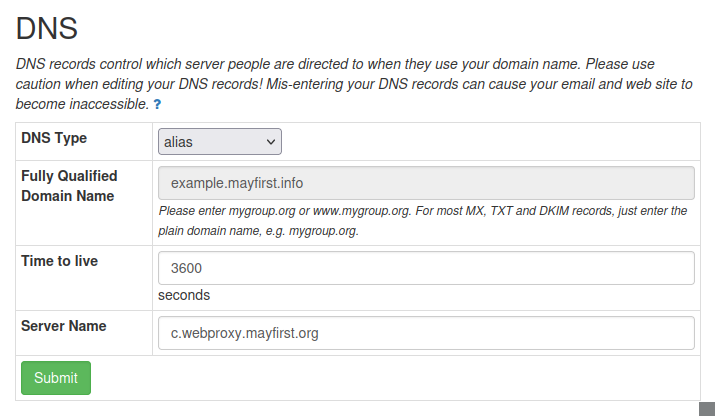
Follow these steps to create an ALIAS type DNS record that points your website domain to a May First web proxy server domain.
Read more about creating an ALIAS record
See our general guide to creating and editing DNS records in the control panel to learn how to find and manage DNS records.
-
Create a new DNS record(/en/guide/how-to-create-and-edit-dns-records-in-control-panel) with type alias
 You cannot add an ALIAS record for a domain that already has an A record. Delete the A record first.
-
Use your full domain or subdomain in the Fully Qualified Domain Name field.
-
Enter a web proxy domain in the Server Name field. Any of the web proxy domains will work, but new sites should use the last one listed.
Web Proxy Domains
a.webproxy.mayfirst.org
b.webproxy.mayfirst.org
c.webproxy.mayfirst.org -
Click Submit
Screen capture of DNS edit dialog:
Screen capture of saved records:
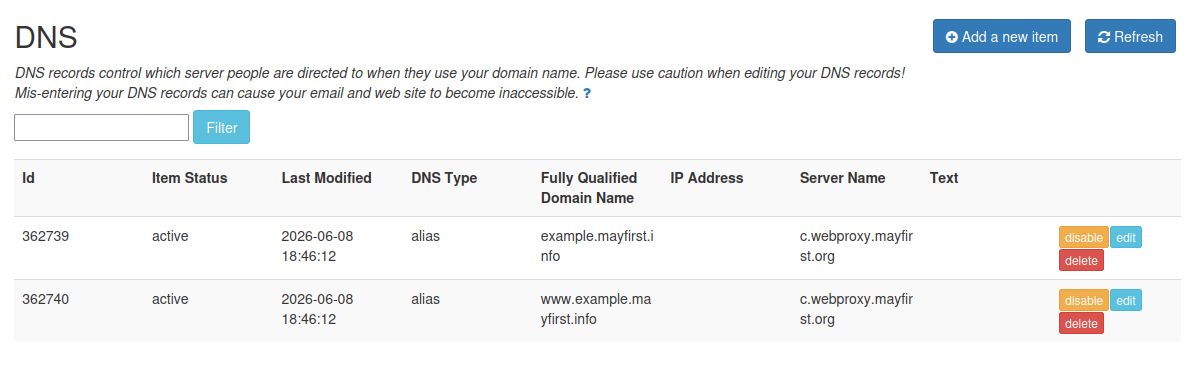
When a domain uses an external DNS provider, DNS records for that domain are marked with an * asterisk in the May First control panel. These records do not affect your public DNS, but they are still required to configure your website within our system.
¶ Using an External DNS Provider
If you manage your DNS outside of May First follow these steps.
Read more...
If your DNS provider supports Flattened CNAME or ALIAS records use that option otherwise follow the instructions for DNS setup with a standard A type record.
Using Flattened CNAME or ALIAS records (Cloudfare, Deflect, ...)
¶ If your provider supports Flattened CNAME or ALIAS records
(Supported by Cloudflare, Deflect, etc.)
Create or update a flattened CNAME or ALIAS record so that it points directly to one of the May First web proxy domains:
Web Proxy Domains
a.webproxy.mayfirst.org
b.webproxy.mayfirst.org
c.webproxy.mayfirst.org
Recommendation: choose the last server alphabetically.
Using standard DNS records
¶ If your provider only supports standard DNS records
- You will need to create or update an A record for your domain so that it points to the IP address of the last web proxy domain in the list below.
Web Proxy Domains
a.webproxy.mayfirst.org
b.webproxy.mayfirst.org
c.webproxy.mayfirst.org
¶ Looking up the ip number
Search for the webproxy domain and copy the ip number associated with the A type record for that domain.
- You can use a web based DNS lookup tool like Domain Digger to find the current IP address of the proxy server.
- You could also use the console on Linux/Unix/Mac OS and a command like
dig +short -ta c.webproxy.mayfirst.orgto get the results.
The IP addresses of our proxy servers may change in the future. Please ensure we have current technical contact information, as we may reach out if record updates become necessary.

¶ Wait for changes to propagate...
Allow sufficient time to pass before testing new DNS changes.
Read more about expected delays...
- When saving a DNS record in the control panel, there may be a significant delay before the record becomes active in the panel itself.
- After activation, DNS changes may take additional time to propagate across the Internet. Learn about DNS TTL values to understand how lowering TTL values before planned changes can help reduce delays.