¶ How to create a new May First user login
Under your hosting order in your control panel, navigate to “User Account”, and press the "Add a new item" button. You will see the following screen
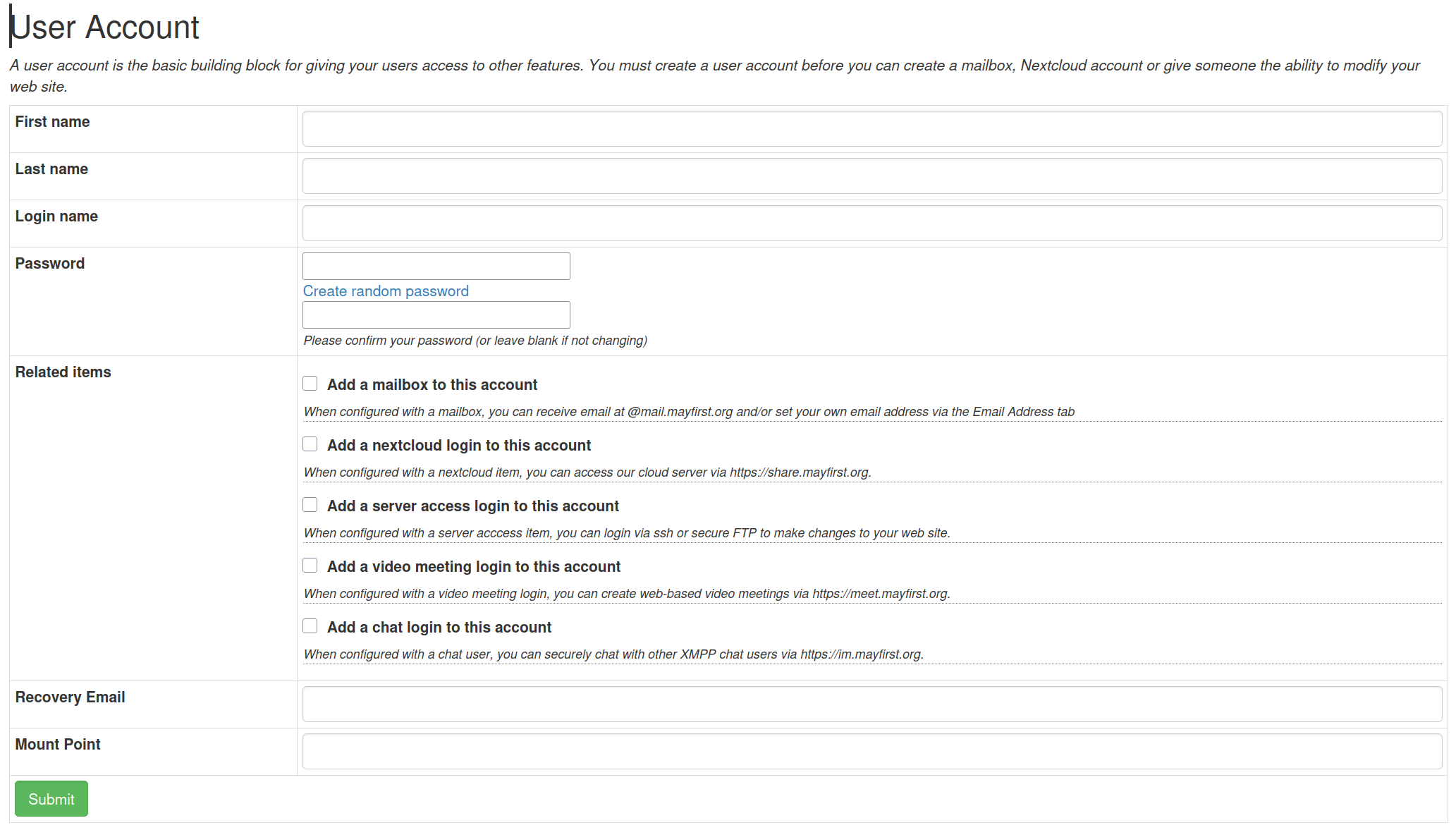
- First and last name: used to identify the user
- Login Name: The username the user will use to log into various May First services including the Control Panel, email, Jisti, Nextcloud, and more
- Password: The password used to log into those various services
- Related Item
- Mailbox: Creates a mailbox for the user under their username @mail.mayfirst.info
- Nextcloud: Adds a login for the May First Nextcloud server at share.mayfirst.org
- Server Access: Adds the ability to use ssh and sftp to access the server, more information on how to do that can be found here.
- Video Meeting: Creates a login for the May First Jisti server at meet.mayfirst.org
- Chat: Creates an account for the May First XMPP server at im.mayfirst.org
- Recovery Email: Email that password resets can be sent to
Once the user is created, it is recommended you give them the chance to reset their own password, to ensure the security of their account.
¶ How to set a recovery email for a user
Under your hosting order in your control panel, navigate to “User Account”, then press edit on the account you want to modify the recovery email for. Enter a new recovery email, then press submit. When you reset your password, it will send the password reset to your recovery email and to the assigned technical contacts for your membership.