¶ Control panel item status reference
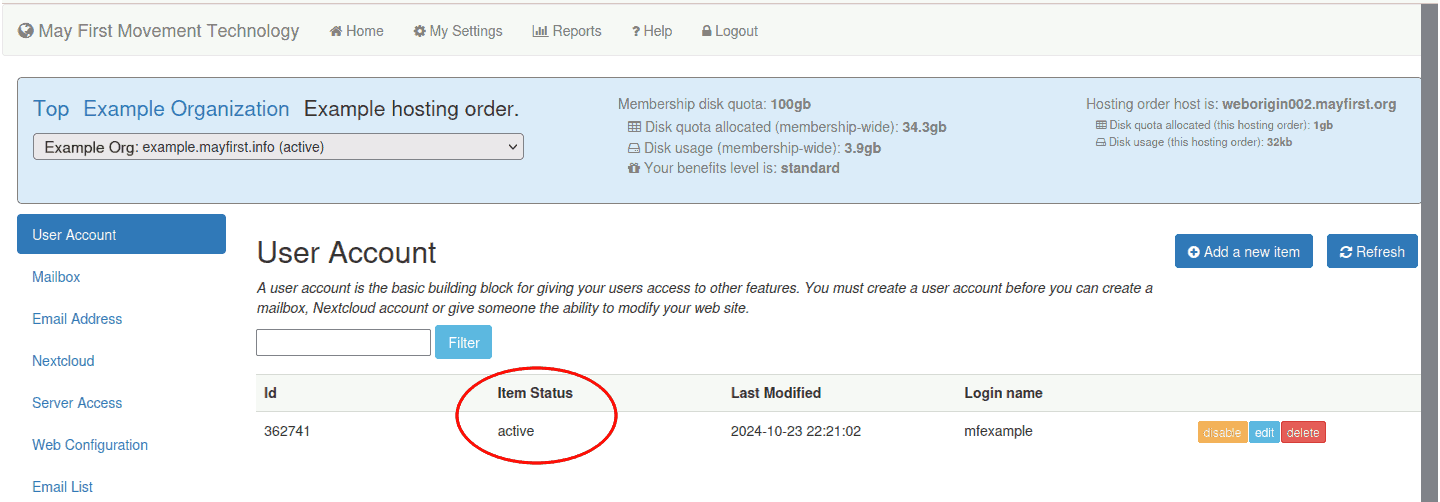
When adding, deleting and modifying control panel items the item status column can update to any of the values defined below.
active, deleted or disabled are normal states for a control panel item.
- active - the item is fully configured and functioning;
- deleted - the item has been deleted from the server but is still in the database (to complete the deletion, click the "Remove deleted items" link);
- disabled - the item has been disabled. No data has been deleted, but it is no longer functional. It can be re-enabled without data loss. Disabled items also have a
strike-through.- disabled label is in italics: If the item is listed as disabled and is in italics, it means that item was disabled via the hosting order. In other words, rather than being disabled individually, the entire hosting order was disabled, including this item.
Pending states should be temporary and should update automatically after a few minutes. If they still fail to update after several minutes and after hitting the refresh button contact May First Support.
- pending-insert - the item is scheduled to be created - it will typically change to "active" within 1 - 2 minutes;
- pending-delete - the item is scheduled to be deleted;
- pending-update - the item is scheduled to be modified - this status is shown after you have submitted a change, but before it has taken effect; Each item that is listed has an "Edit" and "Delete" button.
- pending-restore - aftering fixing a soft error, the item is in pending-restore until the change has taken effect;
Contact May First support if you are unable to fix a soft-error on your own or if you see a hard-error.
- soft-error - after trying to create or modify an event, the system detected an error - you will see the error listed below the item (to fix the error, click to edit the item and re-submit it);
- hard-error - someting seriously wrong has happened - if you see this status, please contact support immediately.
Because the status of an item can change, there is a "Refresh" link that will always display the most recent status of any item.