¶ Synchronizing Calendars and Contacts with your desktop computer
When using Thunderbird (versions 102 and higher) you do not need any special addons. Thunderbird core can synchronize using the "vcard" and "vcal" standards.
¶ Synchronizing your contacts
-
Click the "Address Book" icon in the top of your window
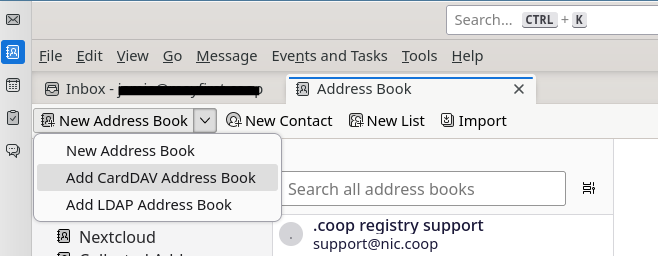
-
Enter your username that you use to login via https://share.mayfirst.org/ (note, the user must be configured with Nextcloud access in the control panel).
-
For location, enter: https://share.mayfirst.org/.
-
Choose the contacts you would like to synchronize.
¶ Synchronizing your calendar
- Click the calendar button in Thunderbird.
- Click the "New Calendar..." button in the bottom left side of the screen.
- Choose "On the network".
- Enter your username that you use to login via https://share.mayfirst.org/ (note, the user must be configured with Nextcloud access in the control panel).
- For location, enter: https://share.mayfirst.org/.
- Do not check "This location doesn't require credentials".
- Do check "Offline Support".
- Choose the calendars to synchronize.
- Do not check "Prefer client-side email scheduling"
TBD